QuickTC Setup
How to connect and operate the QuickTC
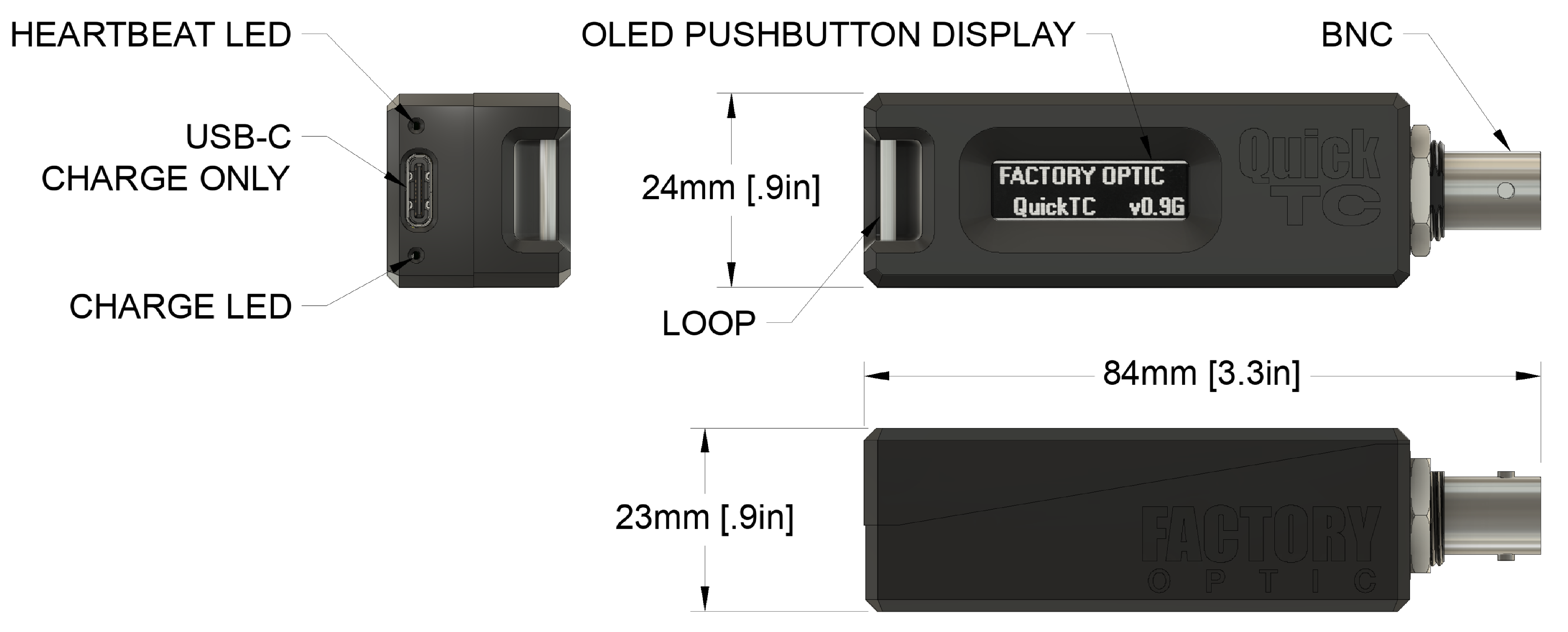
Connecting the QuickTC
Plug the coaxial timecode feed into the QuickTC BNC. The signal should be single-ended SMPTE ST 12-1 linear timecode. QuickTC presents a 10 kΩ input, so it can sit on a 75 Ω distribution without loading it.
Powering On
QuickTC runs from its internal battery. When it is off, any of these switches it on:
- Pressing the OLED display (it is the button).
- Connecting a valid timecode signal.
- Connecting or disconnecting a USB-C cable.
Note: with the battery at 5 % or below the unit only wakes for a USB cable, so that it can charge.
The splash page shows the firmware version for two seconds, then the timecode readout or No Signal.
Heartbeat LED
- Valid timecode: one flash per second, on frame 00. Several QuickTCs on the same feed flash together, which is a quick visual check that they are in sync.
- No timecode: a double flash about once a second.
Charge LED
Lit while a USB-C cable is connected and the battery is charging.
Powering Off
QuickTC switches itself off:
- 15 seconds after power-on if no valid timecode has been seen, or
- 20 seconds after the timecode signal is lost, or
- immediately when the battery reaches 5 %.
The display shows Powering down for a moment first. A button press during that moment cancels the shutdown and wakes the unit again.
While off, the unit still watches for a timecode signal, so plugging in a cable switches it on. Switched off, it uses almost no power.